Meshtastic is being used EXPERIMENTALLY in the Palo Alto AREDN system to provide broad coverage for short messages. Much has been written about Meshtastic, and the interested reader should Google for Meshtastic and/or peruse YouTube for background material.
In the Palo Alto AREDN system, Meshtastic repeaters are linked together over AREDN and share data via our MQTT broker.
Palo Alto ESVs can participate in our Meshtastic network by carrying a Meshtastic client device and/or installing a repeater at their QTH.
Gather the parts
Meshtastic repeaters connect to MQTT over TCP -- specifically TCP over AREDN. Resilience depends on having a working path from your repeater to the AREDN network that will survive a power outage. Here is a typical configuration:
CAUTION: this build was created around the Waveshare SX1262 LoRa HAT. There is a warning on the Meshtastic site that cautions against using this device due to a clock drift issue. I have not had problems with my repeater, but you are warned that you may experience problems.
The recommended approach is to operate your repeater using Power over Ethernet. You will need these components, some of which are linked on the Equipment page.
- Raspberry Pi 4B
- Waveshare PoE HAT
- Waveshare LoRa HAT (optionally, you can get one with GPS that includes a GPS antenna)
- Standoffs for securing HATs to the Raspberry Pi
- SMA-to-N-female pigtail
- 6" ethernet cable
- Ethernet thru-wall weatherproof connector
- Enclosure
- 900 MHz vertical antenna
- Coax to connect the antenna to the N Female pigtail
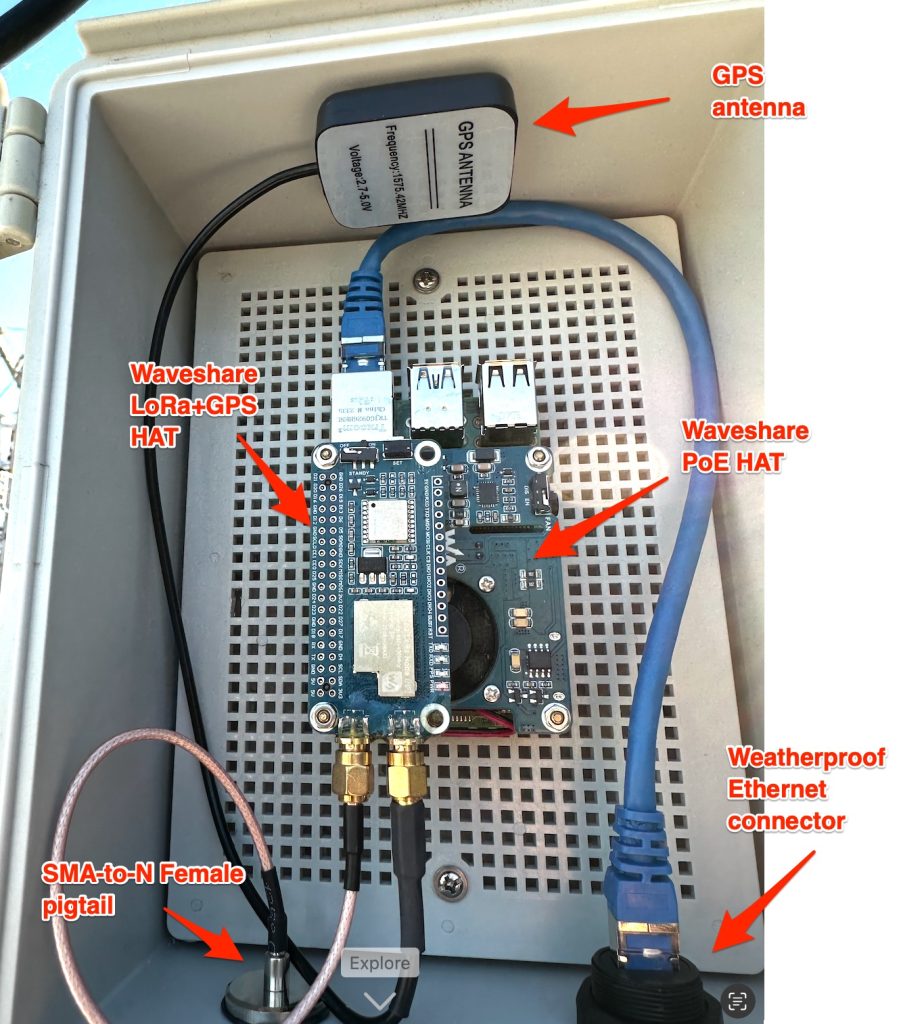
NOTE: the SX1262 HAT comes with u.FL connectors. I removed these on my repeater and replaced them with the more robust SMA connectors. If you decide to stick with u.FL, you will need u.FL-to-N-female pigtail instead of the SMA-to-N-female pigtail. If you want to convert to SMA, let me (W6EI) know -- I can help.
Software
These instructions will get you started. Refer to this hardware diagram for pin information. The schematic (for reference) is here.
Important things to note: You will be using the SPI interface to talk to the LoRa board (not USB). You will need to add these lines to /boot/firmware/config.txt on your Raspberry Pi:
dtparam=spi=on
dtoverlay=spi0-0cs
enable_uart=1
In your Meshtastic config.txtfile, apply these settings:
Module:     sx1262
CS:         21
IRQ / DIO1: 16
Busy:       20
Reset:      18